This guide breaks down each section of the ARM vs Fixed Calculator Report, which compares an adjustable-rate mortgage and a fixed-rate loan side by side. It's designed for loan officers who want to clearly show clients how each option affects their monthly payment, loan balance, and long-term cost, both before and after the ARM's first rate adjustment. The article's sections cover the overall savings summary, loan comparisons, and amortization detail at each stage.
Navigating to the ARM vs Fixed Calculator
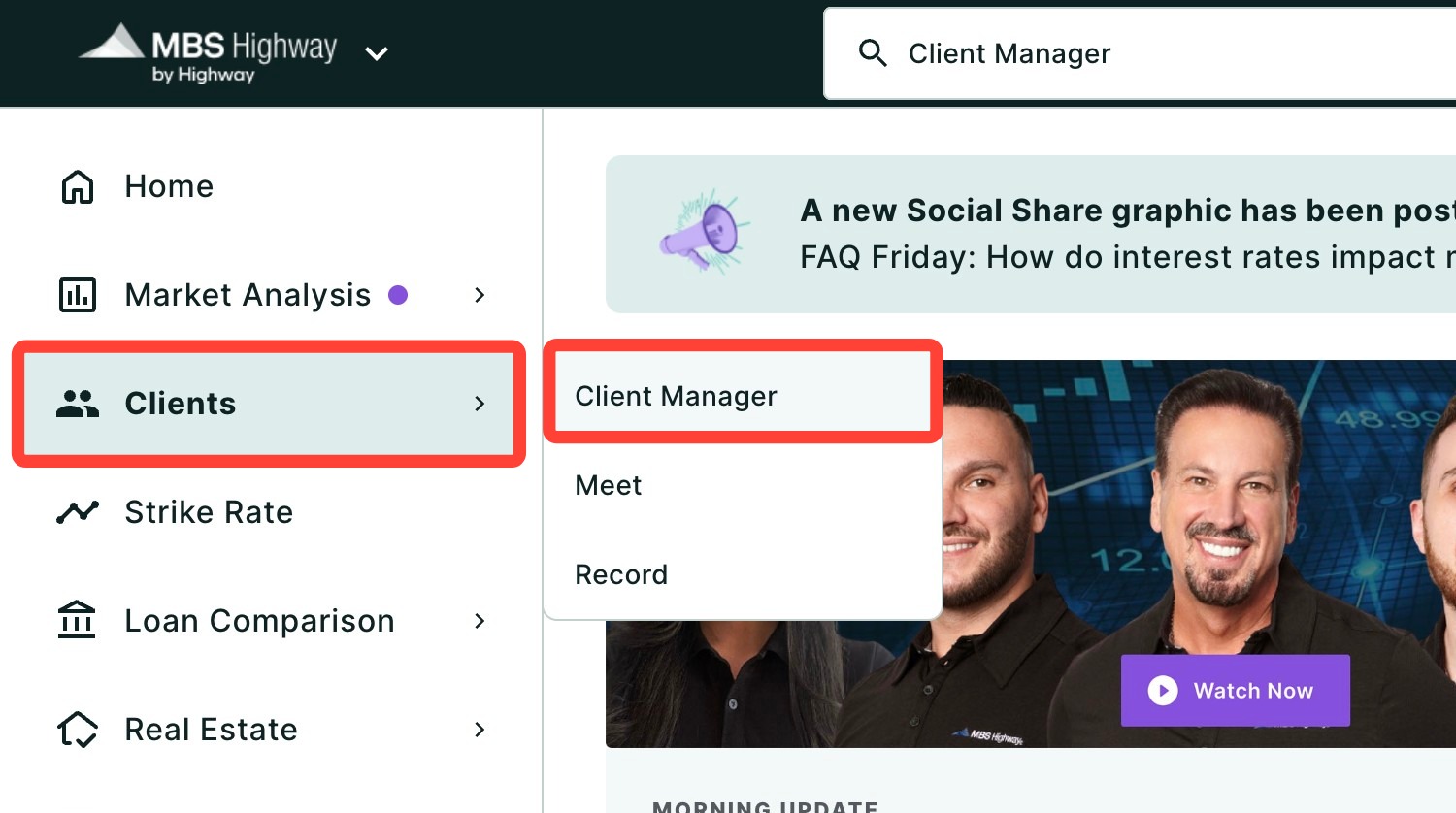
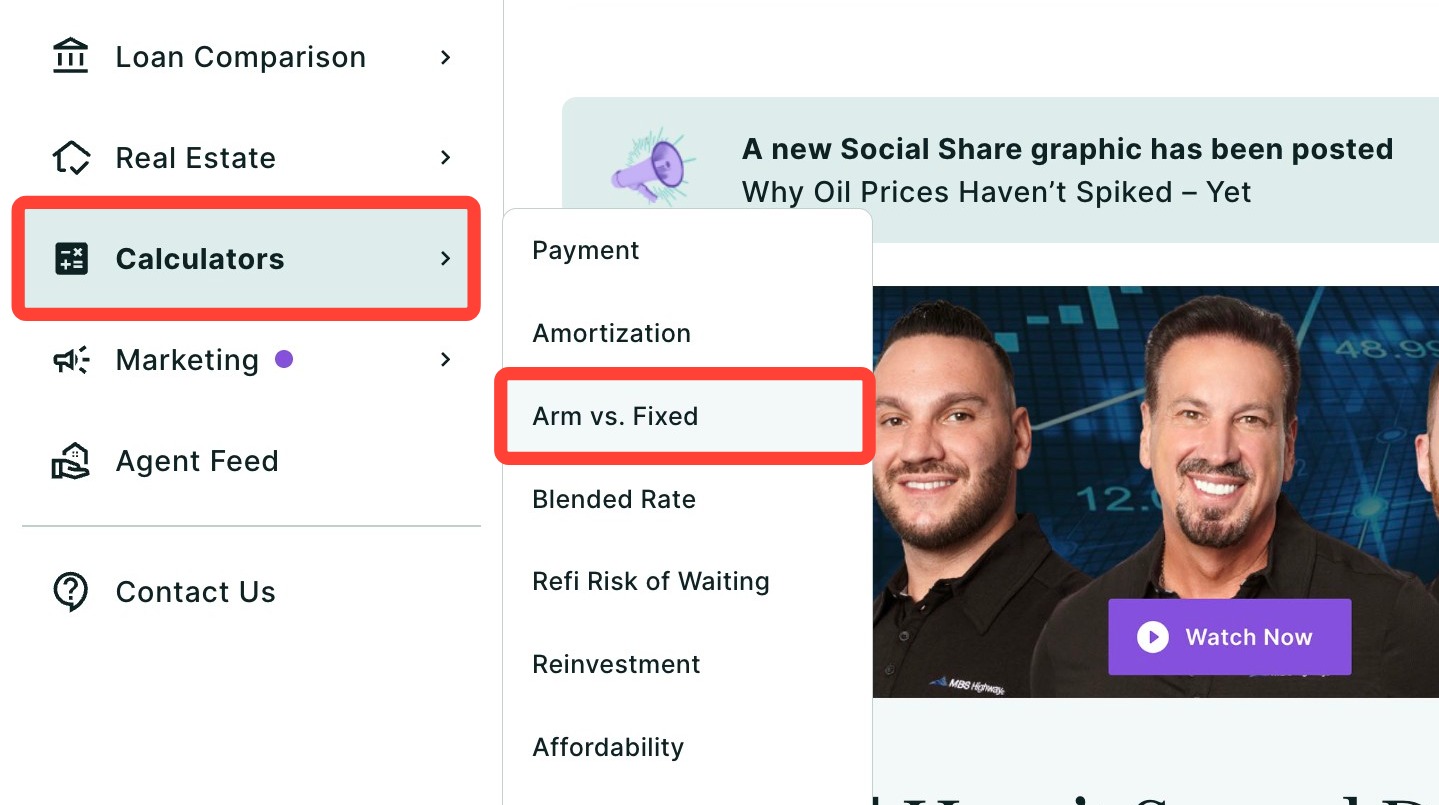
You can find your ARM vs Fixed Calculator within Client Manager and within the Calculators tab of the left-hand navigation menu.
Navigating through the Client Manager
Client Manager allows you to create reports for your clients using previously saved loan and property details, saving you time when building new scenarios.
Navigating through the left-hand sidebar menu
To access the ARM vs. Fixed Calculator using the left-hand sidebar menu, click Calculators, then click ARM vs. Fixed.
💡 Helpful Tip: You can favorite the ARM vs. Fixed Calculator by clicking the star next to its name, so it's easier to find next time. |
Overview
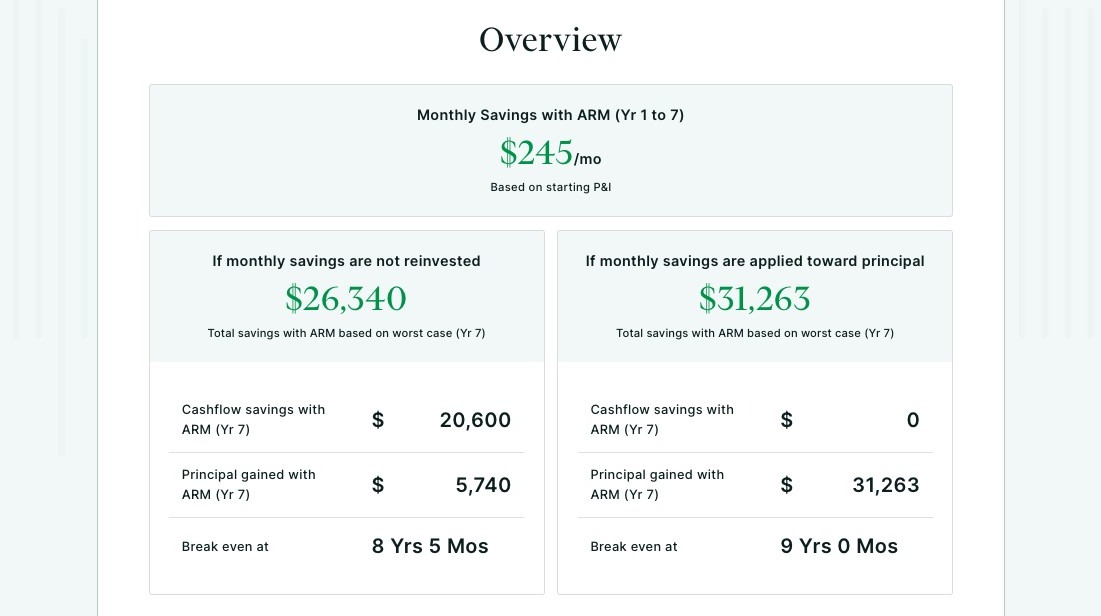
The Overview section shows the total financial benefit of choosing the ARM based on whether the monthly savings are kept as cash or applied toward the loan balance. This allows you to demonstrate how the ARM affects both cash flow and the rate at which the loan is paid down.
There are two scenarios shown below:
If Monthly Savings Are Not Reinvested
This scenario assumes your client keeps the monthly payment savings from the ARM.
-
Total Savings with ARM
Shows the combined benefit of lower monthly payments and the difference in principal paid compared to the fixed-rate loan. -
Cashflow Savings with ARM
The total amount saved from lower monthly payments during the initial fixed period. -
Principal Gained with ARM
Shows the difference in principal paid between the ARM and fixed-rate loan based on their standard amortization schedules. -
Break-Even Timeline
Shows when the ARM would begin to cost more than the fixed-rate loan if held beyond this point.
If Monthly Savings Are Applied Toward Principal
This scenario assumes your client applies their monthly ARM savings directly toward their loan balance.
-
Total Savings with ARM
Shows the total financial benefit created by reducing the loan balance faster. -
Cashflow Savings with ARM
Displays $0 since the monthly savings are applied toward the loan instead of kept as cash. -
Principal Gained with ARM
Shows how much additional principal is paid down compared to the fixed-rate loan when the monthly savings are applied toward the balance. This results in a lower remaining balance over time and greater savings. -
Break-Even Timeline
Shows when the ARM would begin to cost more than the fixed-rate loan under this accelerated payoff scenario.
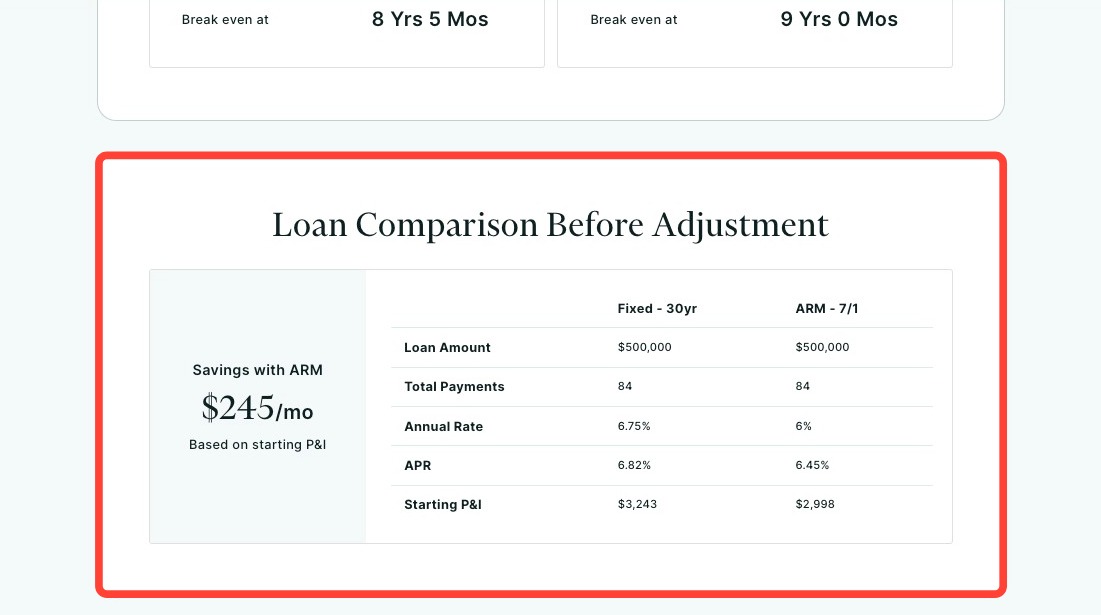
Loan Comparison Before Adjustment
The Loan Comparison Before Adjustment section compares the fixed-rate loan and ARM during the ARM’s initial fixed period, before any rate adjustments occur. This provides a baseline comparison to help you understand how both loans perform before the ARM reaches its first adjustment period.
Amortization & Principal Paid
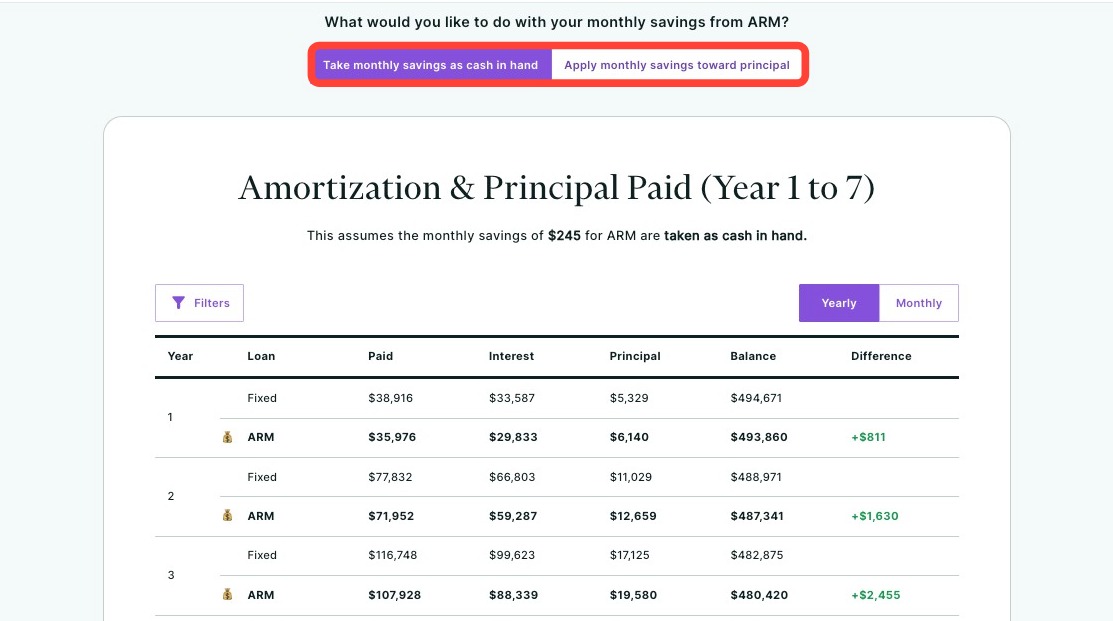
The Amortization & Principal Paid section shows how the ARM and fixed-rate loan amortize during the ARM’s initial fixed period based on the the scenario selected at the top (see image below). You can also filter which loan you would like displayed by clicking Filters.
If savings are taken as cash in hand, the amortization reflects the standard ARM payment. If savings are applied toward principal, the amortization reflects the accelerated paydown from the additional principal payments.
This allows you to see how each approach affects principal paid and the remaining loan balance during the first adjustment period.
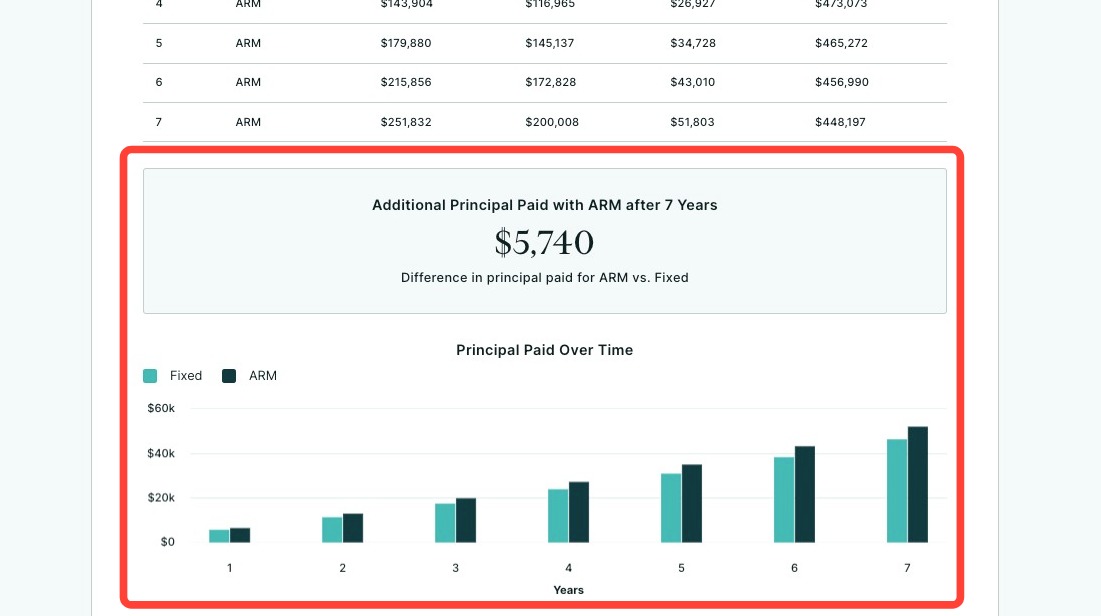
Below the table, you will find the total additional principal paid with the ARM and a side-by-side chart comparing principal paid for the ARM and fixed-rate loan during the initial fixed period.
The Loan Comparison During Adjustment
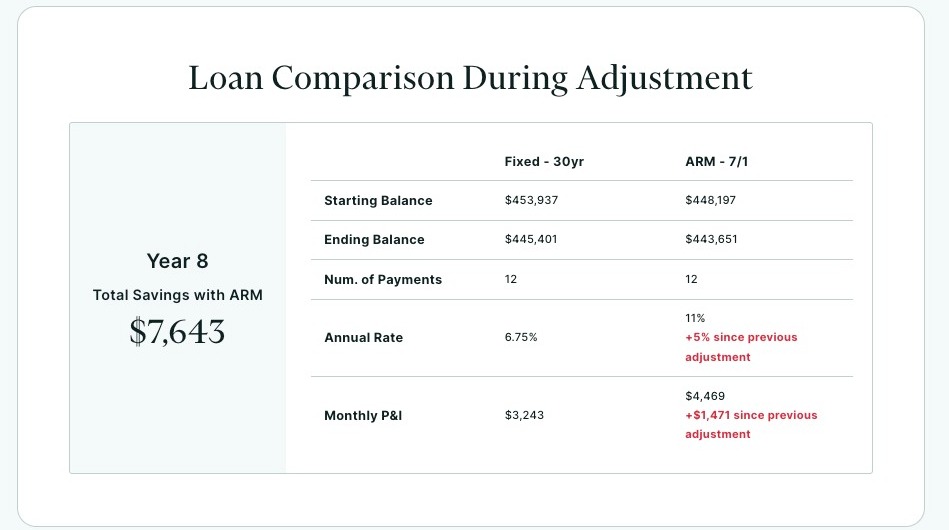
The Loan Comparison During Adjustment section shows how the ARM and fixed-rate loan compare once the ARM reaches its first adjustment period.
It reflects the updated loan balance, interest rate, and monthly payment for each option, allowing you to see how the adjustment impacts the ARM and how it compares to the fixed-rate loan at that point in time.
Summary Section
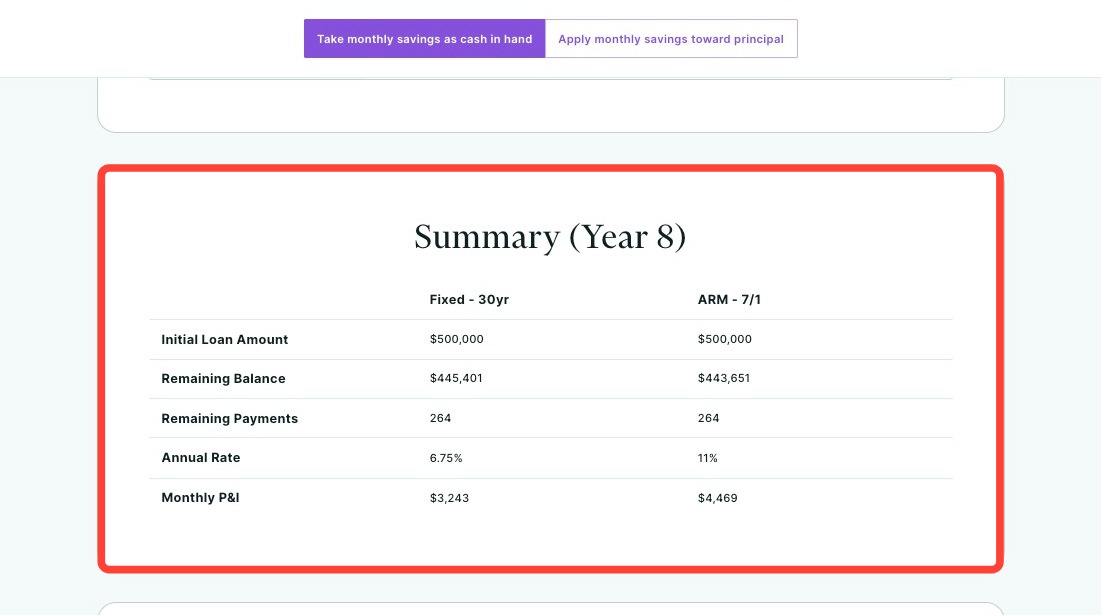
This Summary section provides a snapshot of both loans at the start of the ARM’s adjustment period.
It shows the remaining balance, updated interest rate, and new monthly payment for each option, helping you see how the ARM compares to the fixed-rate loan after the initial fixed period ends.
Amortization
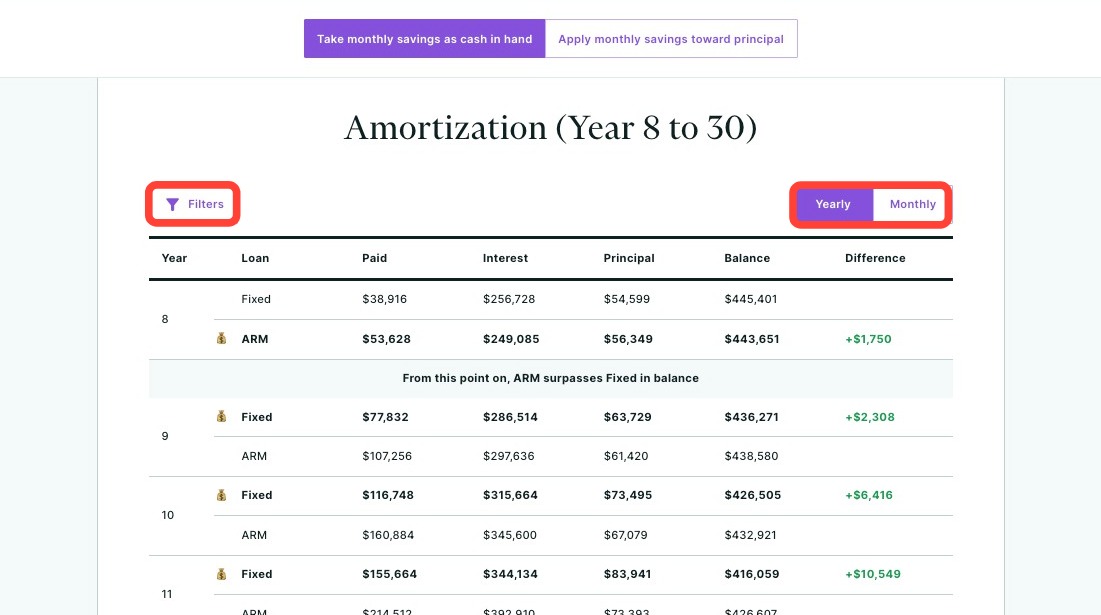
This Amortization section shows how the ARM and fixed-rate loan amortize after the ARM begins adjusting.
It compares principal paid, interest paid, and remaining balance over time, allowing you to see the long-term impact of the adjustment and how each loan performs for the remainder of the loan term.
You can use the Filters button to display one loan or both, and toggle between Yearly and Monthly amortization schedules.
Need Help?
Have questions or want to learn more? Submit a ticket or call us today!
Related to